Simplify Workload Migration to AWS EKS (Elastic Kubernetes Service) by using Jamcracker Cloud Management Platform
In my previous AWS Migration blog “MigratingYour Existing Cloud Workloads to the AWS Cloud using Jamcracker CloudManagement Platform I talked about how Jamcracker helps in migration to AWS using AWS native APIs. In this blog, my focus is how Jamcracker has simplified migration of the on-premise work load to AWS EKS.
EKS (Elastic Kubernetes Service) container orchestration is relatively complex than ECS (Elastic Container Service) orchestration as most of the DevOps engineers say. With Jamcracker CMP DevOps interface, EKS cluster orchestration is simplified and migration capabilities are extended to migrate on-premise workload to the AWS EKS environment.
Now Managed Cloud Service Providers can
leverage migration automation of the Jamcracker Cloud Management platform.
Simplified migration services can be offered in a self-service manner.
Let’s
understand with the help of a use case:
You have IT assets (infrastructure &
application) hosted in your datacentre having VMware vCenter environment and
planning to move them to AWS EKS Jamcracker platform has done full automation
of all the steps.
1.
AWS Account Creation - If you are already using the Jamcracker Cloud Management Platform and
subscribe to AWS service, no change or additional environment configuration
needed. If you don’t have an AWS account, the Jamcracker platform can create one.
2.
Provision EKS Cluster – Creation of EKS cluster and making it application migration ready. Let’s
look at automation steps in detail
which are part of the orchestration plan.
i.
Creation of Bastion Host under
VPC, this is used for the Amazon EKS Deployment and also for the Kubernetes
Deployments
ii.
Creates Nodegroup and Worker Nodes
iii.
Creates VPC, Private Subnet
& Public Subnet
iv.
Creates NAT Gateway with
Elastic IP
v.
Replication in multiple
availability zones
vi.
Creation of Auto-scaler group
vii.
Enable container insights/Cloud
watch for the Amazon EKS cluster
viii.
Setup of the Amazon Elastic
Block Store (EBS) CSI driver.
ix.
Setup of the Amazon EFS CSI
driver.
3.
Provision & Migration of
Database – It starts with the provisioning of
Amazon RDS database service and start database migration from
on-premise to AWS RDS. Migration automation gives the flexibility to define
database migration ways. You can define either direct connectivity or use tools
like CloudEndure.
4. Migrating Container Images – Migration automation gives the flexibility to define container image migration ways. It supports moving images from container registry used on-premise to Amazon Elastic Container Registry (ECR) or users can provide direct access to container registry used at on-premise environment.
5. Deploying Application & Connecting RDS – Once set-up is done successfully users can launch the application to the AWS EKS environment and connect the application to RDS using Jamcracker DevOps automation feature.
6.
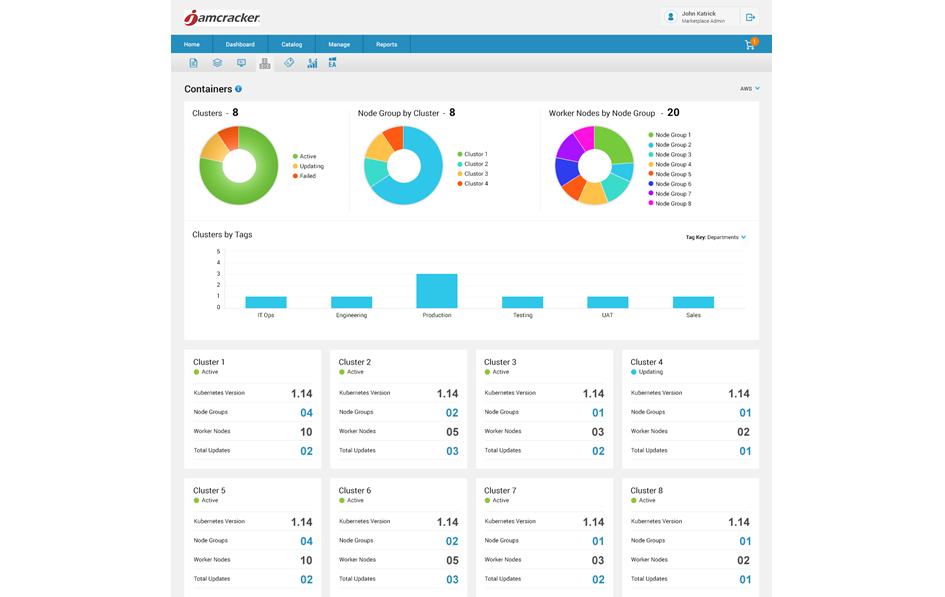
Container Dashboard - Post successful migration, your container environment can be view
and monitor via Container Dashboard. You
can monitor Clusters, Nodegroups, and worker nodes
After migrating to AWS you can have a full track of your cost visibility along with IT governance.
Click
here to read about Visibility and Cost Management of AWS with Jamcracker
platform.
https://www.jamcracker.com/aws-cloud-cost-management
Click
here to read about AWS Governance at Scale.
https://www.jamcracker.com/blogs/aws-governance-at-scale-with-jamcracker-cloud-management-platform
Click
here to read about IT governance of AWS with the Jamcracker platform.
https://www.jamcracker.com/cloud-governance


Comments
Post a Comment